AyeZee Game Arena — Application Framework Developer & Audio Designer on an Interactive Broadcast Tool
- ▸ Built the full dual-window application framework: broadcast-facing game view + operator control panel — delivered in approximately 1 month.
- ▸ Designed and implemented audio for 7 interactive mini-games in a live broadcast context.
- ▸ Built runtime content pipeline allowing the streamer to swap textures, prizes, and game settings.
The Project
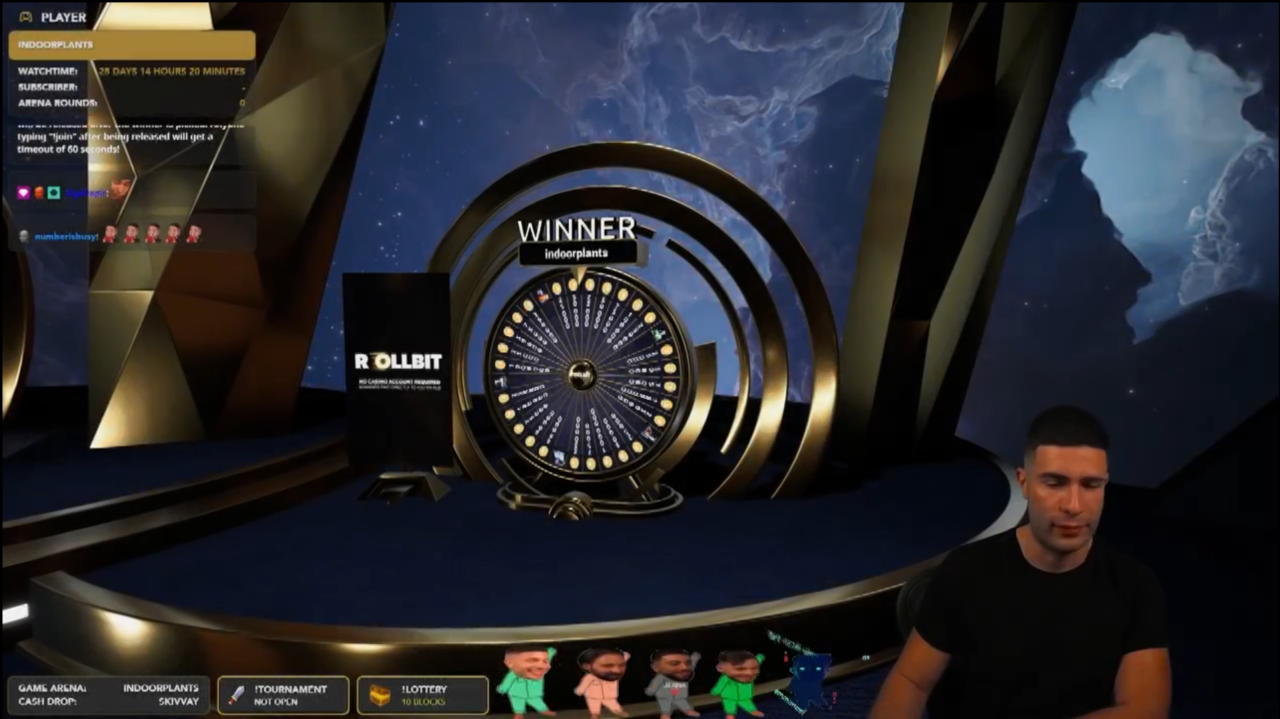
AyeZee Game Arena is a dual-window interactive entertainment application built for Twitch streamer AyeZee (ayezee.tv), a high-profile casino/gambling content creator. The application features seven mini-games — three wheel spin variants, a ball-drop game, a “pick a lucky case” game, a card-pick game, and a meta-game that randomly selects which game the player plays — that the streamer’s audience can participate in to win prizes, all broadcast live on Twitch.
The architecture splits into two windows: a broadcast-facing game view (streamed to the audience) and an operator control panel used by the streamer to switch between games, start/end rounds, open cases, customize prizes, swap textures, and manage the show flow in real time. A custom spline-based camera state machine provides cinematic sweeps and transitions between games, giving the stream a polished, broadcast-quality visual flow.
Ziad (@ayezee) • Instagram video
What Was Delivered
- Complete dual-window broadcast tool delivered in ~1 month — live at ayezee.tv
- Runtime content pipeline allowing live texture, prize, and game setting swaps
- 7 interactive mini-games with full audio implementation for live broadcast context
- Operator control panel gives streamer full game management and diagnostics in real time
My Role
I was the Application Framework Developer and Audio Designer on a 5-person freelance team — our contracting studio (Matima Studio), which I co-founded. Other team members handled the camera state machine implementation, visual art/design, individual game logic, and level design. The project was delivered in approximately one month.
My responsibilities covered the core application architecture, the multi-window system, the full control panel and operator tools, all user interface work, a runtime content pipeline for packaged builds, a logging/diagnostics system, all audio (SFX), and the player pawn. Beyond the technical work, as co-founder of the studio I was involved in project scoping and delivery coordination.
What I Built
Application Framework & Game Switcher
The backbone of the entire application. I designed and built the top-level framework that manages transitions between seven game modes, routes control inputs from the operator panel to the active game, and connects the camera state machine (built by a teammate) to experience interfaces. This was the central state machine that everything else plugged into — without it, the individual games, camera system, and operator controls would have no way to communicate.
Multi-Window Architecture
I implemented a dual-window setup in UE4, separating the broadcast-facing game view from the operator control panel. This is an unusual type of UE4 application — the streamer sees the control panel on their screen while the audience only sees the polished game view on Twitch.
Control Panel & Operator Tools
A full operator interface for live show management. The control panel lets the streamer switch between games, start and end rounds, open selected cases, configure prizes per game, customize visuals, and monitor diagnostic logs — all in real time during a live broadcast. I also built a custom log and warning system that surfaces directly in the control panel, giving the operator real-time diagnostic feedback on application state.
Runtime Content Pipeline
I built a texture importer system that allows the client to swap prize visuals in the shipped application without needing access to Unreal Editor. This enabled per-stream customization — the streamer could drop in new prize images before each broadcast.
User Interface
I designed and implemented all UI across the application:
- Control panel for live show operation (game switching, round control, case opening, prize management)
- Prize editing interfaces with per-game visual customization
- Game results splash screens displayed to the audience after each round
- Settings and visual customization tools
- In-game UI elements across all seven game modes
The UI needed to serve two very different audiences simultaneously: the operator panel had to be functional and fast for the streamer managing a live show, while the game-facing UI had to be visually engaging for the Twitch audience.
Audio
I handled the complete audio pass for the application — sound effects for all seven game types (wheel spins, ball drops, card reveals, case openings, win/loss). All audio was sourced, designed, and integrated by me.
Player Systems
Built the player pawn and integrated it with the game-switching framework.
Key Challenges & Solutions
Multi-window architecture in UE4: Running a UE4 application across two separate windows — one for broadcast, one for operator control — is an unusual application type not commonly seen in UE4 projects.
Runtime texture importing in packaged builds: The texture importer needed to load external images at runtime in a cooked, packaged build, enabling a non-technical client to drop in new prize images per stream.
One-month delivery timeline: The entire application — framework, multi-window system, control panel, all UI, audio, runtime content pipeline, logging, player systems — was delivered in approximately one month with a 5-person team. This required clear interface boundaries between team members’ systems, efficient parallel work streams, and rapid iteration.
Tools & Tech
Unreal Engine 4, Blueprints, Multi-Window UE4 Application, Runtime Asset Loading, Windows
Need a custom tool or interactive application built fast?
Tell me what you're building and what you need. I typically respond within 24–48 hours.
Start a Conversation